


QuickBooks Error 80029c4a: What's Going On and How to Get Past It
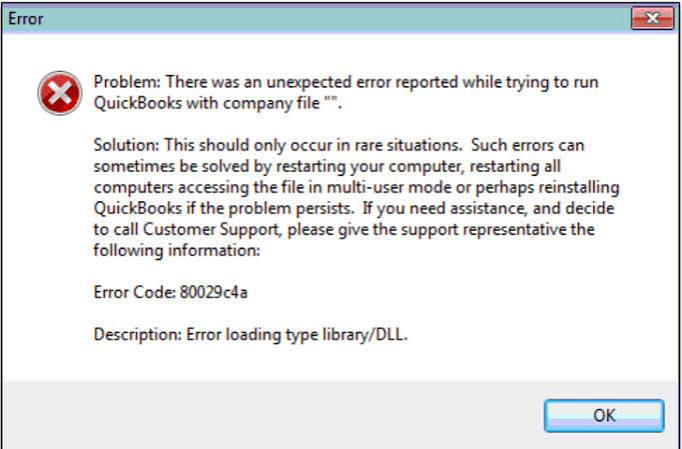
You go to open QuickBooks, same as any other day, and instead of your dashboard there's this: "Error Code: 80029c4a – Error loading type library/DLL." No context. No plain explanation. Just a code that means absolutely nothing unless you've already run into it once before.
Here's the short of it — QuickBooks needs a bunch of small system files, DLLs, just to get itself running, and right now one of them isn't loading the way it's supposed to. Could be missing. Could've gotten damaged somewhere along the line. Could be something on your machine actively getting in its way. Whatever it is, the fix usually takes less time than reading about the error, and your company file is basically never at risk through any of this.
Why QuickBooks Error 80029c4a happens
-
Incomplete install — Windows was mid-update, or setup got interrupted partway through, and a file that should've landed on the drive just didn't make it.
-
Antivirus overreach — security software decides QBW32.exe looks suspicious and quietly quarantines it with zero warning, so QuickBooks Software just won't open one day and you've got no idea why.
-
Leftover registry junk — old entries from a previous uninstall clash with whatever's currently on there.
-
Version mismatch — running an older QuickBooks build on a Windows version it was never really tested against.
-
Malware — rarer than people assume, but it happens: something's chewed through the files QuickBooks relies on to run.
Most people spot it the second they try launching the program. Sometimes there's a slow computer, or an unrelated crash happening around the same time, which usually means the real issue sits at the system level rather than being QuickBooks' fault specifically.
Fixing QuickBooks Error 80029c4a
Work through this in order — most people don't get past step three.
-
Restart your computer first. Sounds like a non-answer, but a clean reboot genuinely clears out temporary conflicts, especially when this started right after a Windows update landed.
-
Run QuickBooks Tool Hub. Intuit built this specifically for problems like this one.
-
Download it from their official site (get rid of any old copy first)
-
Open it, click into Program Problems
-
Run Quick Fix My Program — it kills background QuickBooks processes and clears out small file conflicts without you having to dig through anything yourself
Side note: if what you're dealing with is a single company file refusing to open, rather than QuickBooks itself failing to launch, that's a different problem
Check your antivirus.
-
Turn it off for a couple minutes, try opening QuickBooks
-
Opens fine? That's your culprit
-
Don't leave protection off permanently — add QBW32.exe, the install folder, and your company file folder as exceptions instead. That whitelist option exists in basically every antivirus, just usually buried a few menus deep
Repair the install.
-
Control Panel, Programs and Features
-
Find QuickBooks, click Repair — not Uninstall, easy ones to mix up
-
Rebuilds whatever's broken, leaves your data completely alone
Re-register the specific DLL causing trouble.
-
Open Command Prompt as administrator
-
Navigate into your QuickBooks install folder
-
Run regsvr32 against that file
-
Fair warning, this step trips people up if Command Prompt isn't something you're used to — no shame in handing this one over to IT or QuickBooks support instead of white-knuckling it alone
Update Windows and QuickBooks both. Intuit ships fixes for exactly this kind of thing fairly often, and sometimes the error just quietly stops happening once you're caught up.
Clean install, last resort.
-
Uninstall QuickBooks completely
-
Rename (don't delete yet, just in case) whatever folders are left over
-
Reinstall from scratch
-
Your company file lives somewhere else entirely, so none of this threatens your books — though backing up first is just common sense before you touch any of it
Keeping it from coming back
A few habits worth keeping once you're back up and running. Leave those antivirus exceptions in place so a scan down the road doesn't flag the same files all over again. Install updates as they roll out instead of letting a stack of them pile up. And if an install looks frozen mid-process, give it a minute before force-closing it — half the time it's not actually stuck, just slow.
Running QuickBooks across more than one machine, or with a small team? Worth a look at our rundown so you can tell right away whether something new is connected to this or its own separate headache.
If nothing above fixes it
QB Tool Hub or a repair install clears this up for most people, most of the time. But if you've genuinely worked through the whole list and QuickBooks still won't launch, or the error keeps crawling back every few days no matter what, that usually points somewhere deeper in Windows itself — a corrupted user profile, maybe, or a registry issue bigger than QuickBooks alone. That's the point to bring in a certified ProAdvisor or your IT person rather than keep circling the same fixes.
If the problem continues, Accounting Assist Pro can provide further guidance. Call +1-888-892-5727 for assistance with troubleshooting QuickBooks Error 80029c4a.
FAQs
Will this delete my company file?
No, not even close. This error's about program files, not your data. Repairing or reinstalling leaves your company file exactly where it was. Back it up anyway, just as good practice, not because this specific fix threatens it.
Why does my antivirus keep flagging QuickBooks?
Some antivirus software misreads how QuickBooks handles its background processes and treats it like a threat. Whitelisting the install folder and QBW32.exe usually puts a stop to it for good.
Do I need Tool Hub, or can I fix this some other way?
You can skip it if you'd rather. A restart, an antivirus exception, or manually re-registering the DLL will each work on their own. Tool Hub's just faster since it runs a few of these checks at once.
Does this happen on Mac too?
Nope, Windows-only. It's tied to how Windows specifically loads DLL files, and Mac's file system works differently, so this particular code just never comes up there.
How do I check if my QuickBooks needs updating?
Open QuickBooks, go to Help, then Update QuickBooks Desktop, and it'll show you what's pending. You can also cross-check your version number against Intuit's release notes if you want to be thorough.
 Italiano
 English
 Arabic
 French
 Spanish
 Portuguese
 Deutsch
 Turkish
 Dutch
Dutch
 Russian
 Romaian
 Portuguese (Brazil)
 Greek
Greek